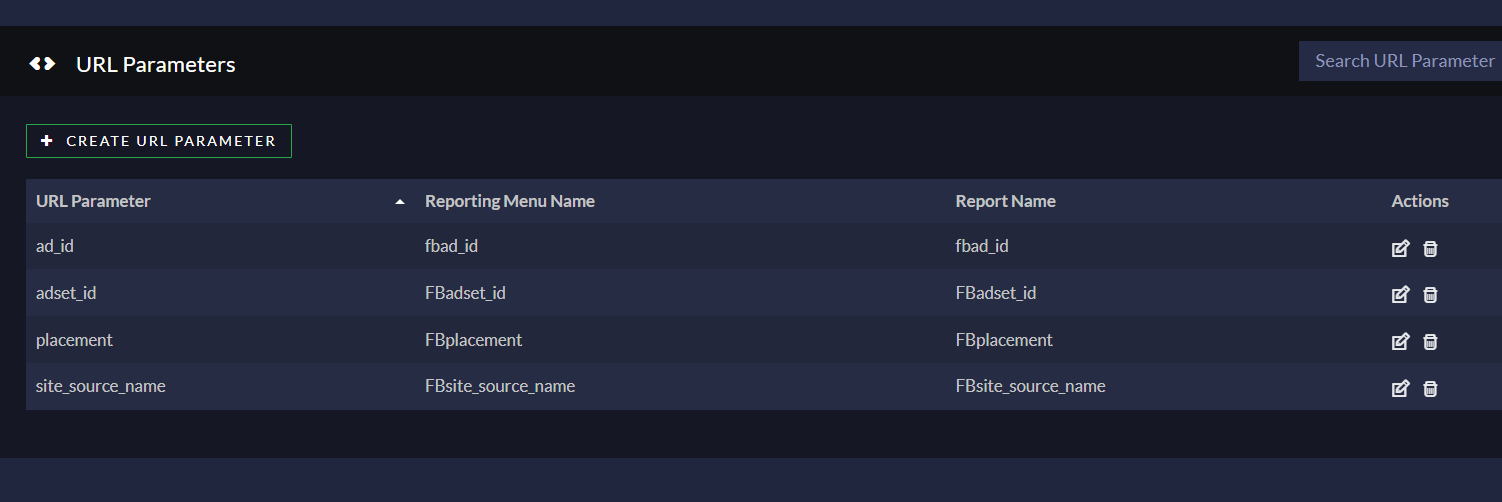
Q: When calls show up as -no value- in reports, what does that mean?
A: “no value” on buyer/target column means the calls that weren’t connected to any target, so there is no value/name to be showing.
Q: How to troubleshoot the reason for “NO CONNECT” in Ringba
A:
If you go to Reporting > Default page and expand the arrow icon on the left side of the call under “Call Details” you will be able to see on the “Events” tab the details for these calls.
All these calls have a different reason for not being connected.
The caller id +1786XXXXXXXX has one call that is not connected and another one that has been connected.
Here is an example of a call that was not connected. Once you expand the call, you’ll be able to see that the first 3 targets were closed due to the hours of operation and the last one did not match the state filter.
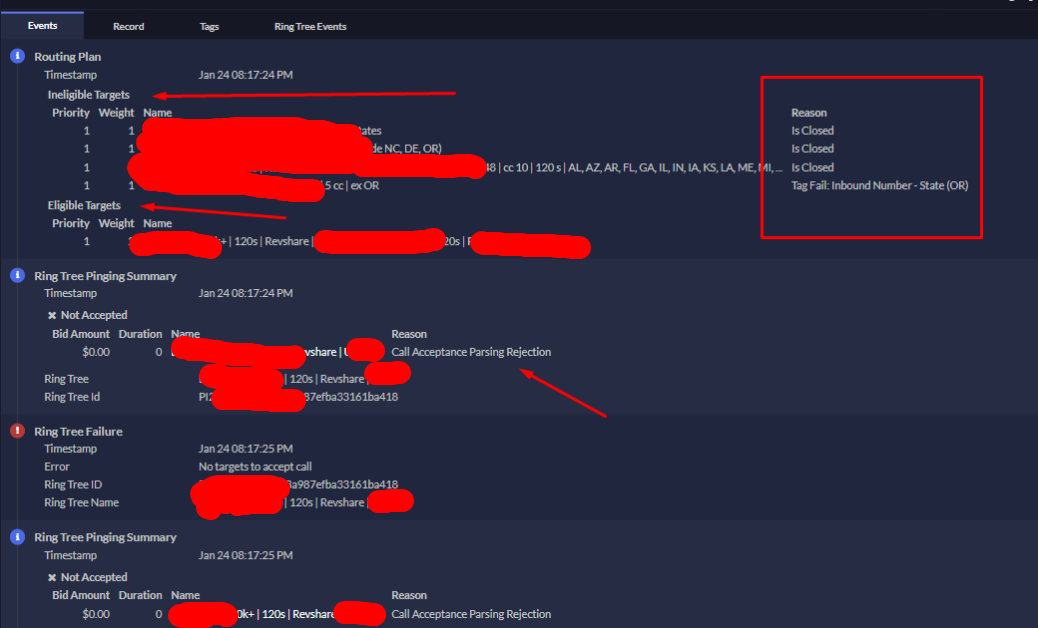
The only eligible target (XXX | XXX | XXX | 120s | Revshare | XXX) rejected the call , so you can go to “ring tree events” and check the response provided by their buyer, as you can see below:
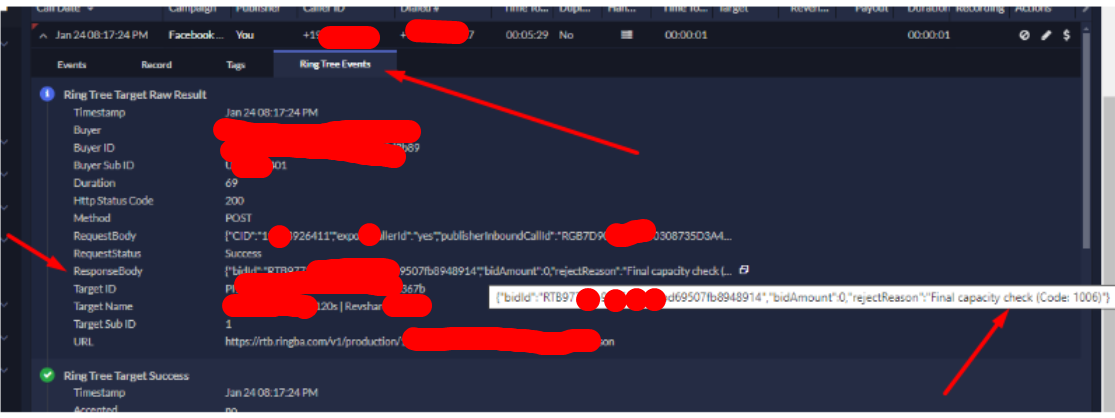
This was error code 1006 inside ringba’s RTB documentation [here] that means they didn’t accept the call due to a tag, or lack of a tag when we sent it. To solve this reach out to the buyer to find out what tag was needed or not needed.
Q: How / Where Can I Access my API token to create custom tools for my Ringba?
A:
you can refer to this page to create credentials for the API — https://developers.ringba.com/#4e7c3eb0-cfcc-4484-bab2-8628a4c65b34 This is the section for creating targets via API – https://developers.ringba.com/#174f0c37-f50b-4ba1-b2e2-de8ec23c48ca
Q: How can I add more accounts to show here where it says “SWITCH ACCOUNT” on the top right corner in RINGBA?
A: Once the users from other accounts invite you to access their accounts as an admin/publisher/buyer user, you’ll be able to see the option to swap the accounts at the top of the page. But for this, you should use the same email as a login on all of these accounts.
Q: How to add Missing Converted Calls (Conversions) to my Ringba? Webhook failed to post, or the integration didn’t work with the Buyer. What to do?
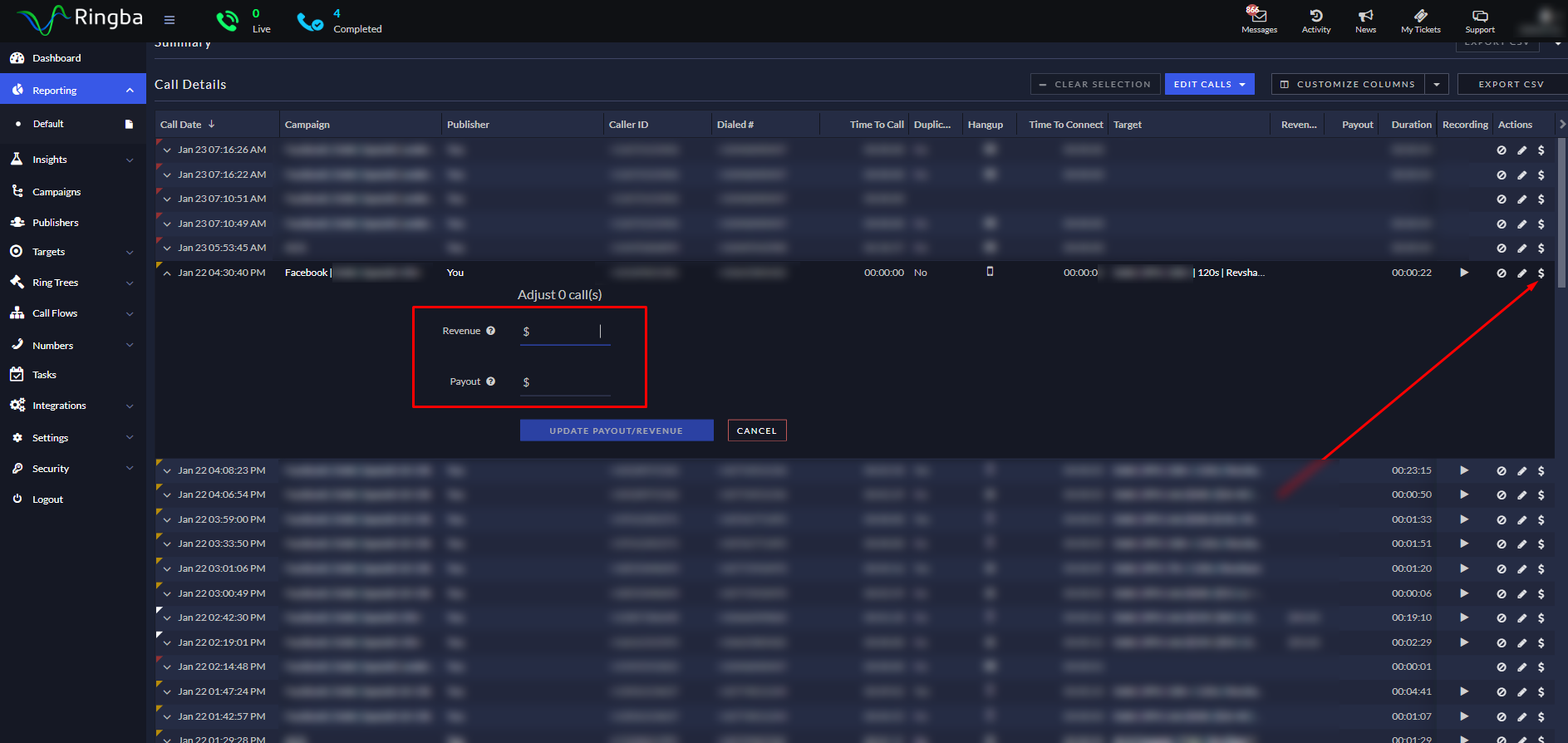
A: In this case, you can adjust the revenue/payout of the call by going to the reporting page and clicking on “Adjust Call Payments” under Actions. Add the correct value for the revenue/payout and click on “Update Payout/Revenue”.
Q: What if I have 3 different numbers in my pay per call landing page, the Ringba call tracking tags do not work… how to fix?
A: If you have multiple phone numbers in your landing page code, IE: you are using a survey style lander which shows a different number depending on what the visitor answers, then you can use the following by placing this before the </body> closing tag on your page, and replacing the ringba tracking tags ID # in it. You want to make sure the ID of your <DIV> matches each tracking tag for this to work.
<script>
    function loadRingbaScript(scriptId) {
        // Remove any existing Ringba script
        const existingScript = document.getElementById('dynamicRingbaScript');
        if (existingScript) {
            existingScript.remove();
        }

        // Create a new script element
        const script = document.createElement('script');
        script.src = //b-js.ringba.com/${scriptId};
        script.id = 'dynamicRingbaScript';
        script.async = true;

        // Append the script to the document
        document.body.appendChild(script);
    }

    // Event listener for buttons with class '15kbutton'
    document.querySelectorAll('.button1').forEach(button => {
        button.addEventListener('click', function() {
            loadRingbaScript('CA0a2a32a0dXXXXXXXX');
        });
    });

    // Event listener for buttons with class '10kbutton'
    document.querySelectorAll('.button2').forEach(button => {
        button.addEventListener('click', function() {
            loadRingbaScript('CA23751ee620cXXXXXXXXXXXXXXX');
        });
    });

    // Event listener for buttons with class 'under10k'
    document.querySelectorAll('.button3').forEach(button => {
        button.addEventListener('click', function() {
            loadRingbaScript('CA67ed50a1f6XXXXXXXXXXXX');
        });
    });
</script>
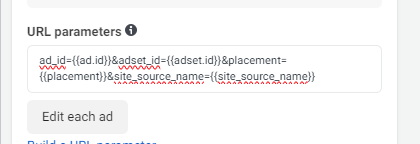
Q: How To Track Facebook Dynamic Parameters like {{ad.id}}, {{adset.id}}, {{placement}}, {{site_source_name}} and more using Ringba to know which Ad/Adset/etc resulted in converting calls.
A: On your facebook ad you need to put in the parameters like this:
In Ringba on the left menu select Integrations > URL Parameters and add variables like this: