

Short answer: RedTrack is a cloud-hosted ad tracker aimed at affiliates, media buyers and ecommerce brands, with paid affiliate plans from $79 per month (Builder) to $999 (Enterprise), a 14-day free trial, and Conversion API support for Meta, Google, TikTok and other platforms. Prices and features below were checked against RedTrack’s own site on October 5, 2026; statements about speed or ease are impressions from earlier use, not new tests.
New to tracking? Start with the affiliate tracking guide.
Setting up marketing campaigns is a big part of the business and while it may seem simple at first, the intricacy and details you have to correctly set up can be quite tricky. This is why there was a need for tools and platforms to help out affiliates and simplify the process as a whole.
If you are in the affiliate business you probably heard of RedTrack. And there is a good reason why! RedTrack is one of the best-known cloud trackers among affiliates and media buyers. RedTrack is designed to help affiliates tackle difficult and complex things like tracking and data handling with just one tool.
RedTrack is mainly used for
- Tracking Ads
- Managing And Automating Traffic Sources
- Access To Advertiser Reporting
- Management Panels For Affiliates/Publishers

Tracking Ads
With tracking, the core things you need to focus on are speed, accuracy, and reliability. This is done via 4 features that RedTrack provides.
- Impression Forwarding And Tracking
RedTrack allows you to track clicks, impressions, and conversions of every banner and ad. This enables you to get a big picture of your campaign, how well it is doing, and what parts need improving.
Impression forwarding is mostly for big affiliates and agencies that work with big players like Amazon and other eCom companies.
- No-Redirect Tracking
Tracking traffic organically has never been this easy with the built-in scripts RedTrack offers. Use the trackers on al kinds of traffic including things like Facebook and Google. You will be provided with detailed performance reports based on every traffic source too!
- Multi-step Funnels
You can set pre-landers, landers, and offers. Mix them and set up the weight of each of them for users.
- S2S Postback Tracking
Track pixels reliably and securely. This can even be used with GoogleAds and Analitycs.
Not sure how conversions get reported back? Read what a postback URL is and what it does.
- Multi-Access Managing
Used for granular managing of the team and their accessibility.
- Fraud Detection
RedTrack has offered fraud and bot detection through a partner integration. Check the current terms and any extra fees on RedTrack’s site before you count on it.
Overview

RedTrack is a SaaS solution, so you don’t need your own servers, cookie-less tracking is built in and they are affordable and competitive with their pricing. The interface itself is clean and simple on first look, but the menus offer a vast number of submenus that have all kinds of useful data and settings.
You can find a bunch of useful features hidden in the menus like:
- Report templates
- Consolidated reports
- Multiple workplace settings
- Auto-optimize steams
Traffic Source Management
Google and Facebook are among the traffic sources that RedTrack can manage automatically. With these options, you can update costs, pause campaigns and creatives, and blacklist placements. With this, you can set-up rules to pause campaigns if you see performance drops and save a lot of money you could lose overnight. You can automate most of these functions and save yourself time and money
Conversion API and Meta Partnership
RedTrack lists Conversion API (server-side) support on every paid plan, covering Meta, Google, TikTok, Snapchat, Bing, X and Pinterest, and describes itself as an official Meta Business Partner. It also lists an AI Copilot and says ad spend is synced every 5 minutes (RedTrack’s own pages, checked October 5, 2026).
Analytic Solutions
You will receive a detailed report with more than 30 data attribution points. You will get everything you need to understand your ad campaigns. Offers, landings, devices used, OS, GEOs, languages, and much more, all in one screen.
You can also customize your dashboard according to your usage and needs. Add or hide parameters as well as re-order them to get your optimal workflow.
Creating Campaigns Made Easy
You can create full campaigns in 5 simple steps. All you need to do is:
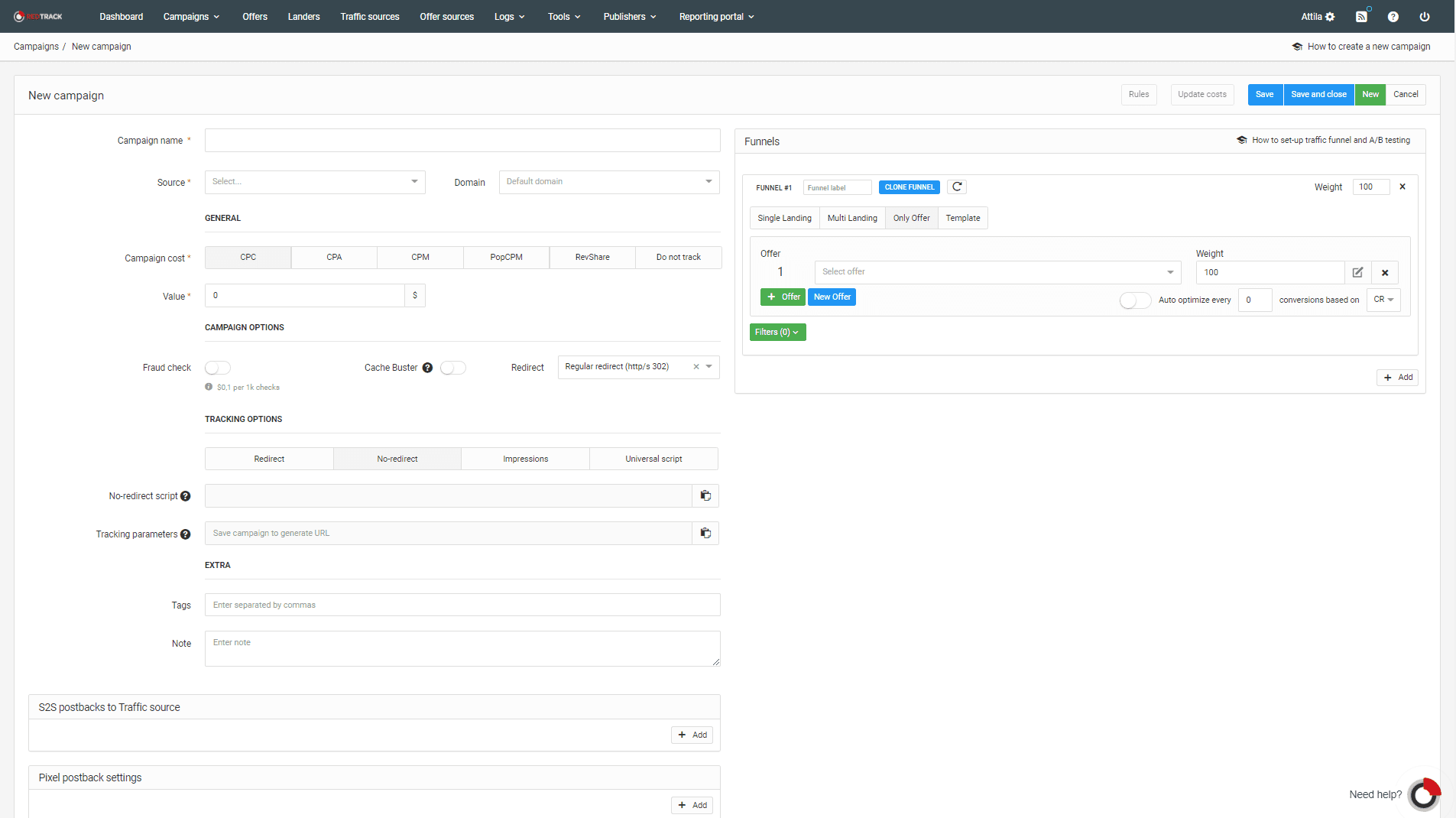
- Set-up The Traffic Source
Choose from RedTrack’s library of integrations (the site lists 200+ across traffic sources, networks and tools) and save time creating them. If you need something special you can always add your own. You will also get impression tracking and S2S postback tracking during the setup. The Postback URL is created automatically and you don’t need to do anything special.
- Set-up Offer Sources
Pick a source and if it is the system, it will autocomplete most of the parameters.
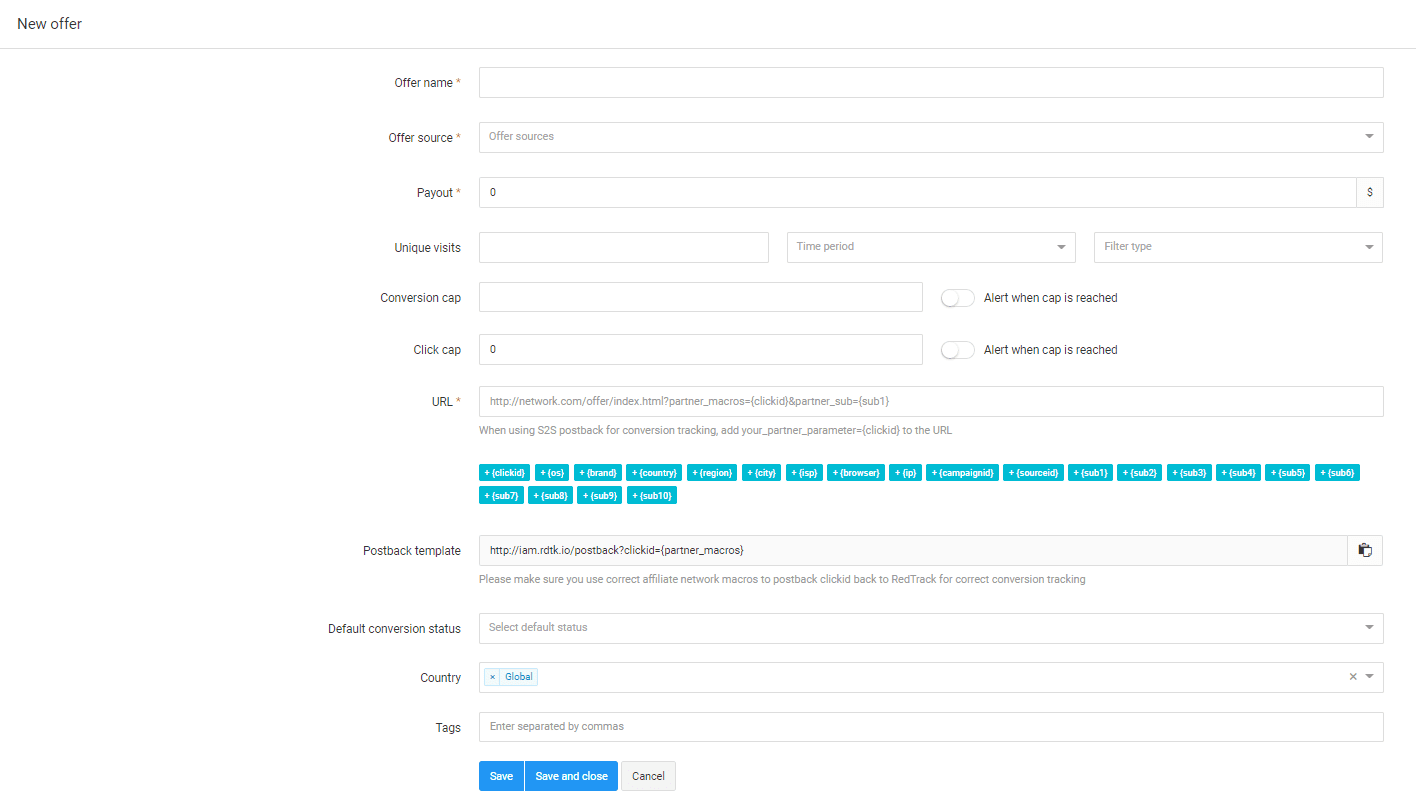
- Offer Settings
Select a name for your offer, pick an offer source, and enter the payout. You can also add things like unique visit caps and conversion caps to limit conversions.
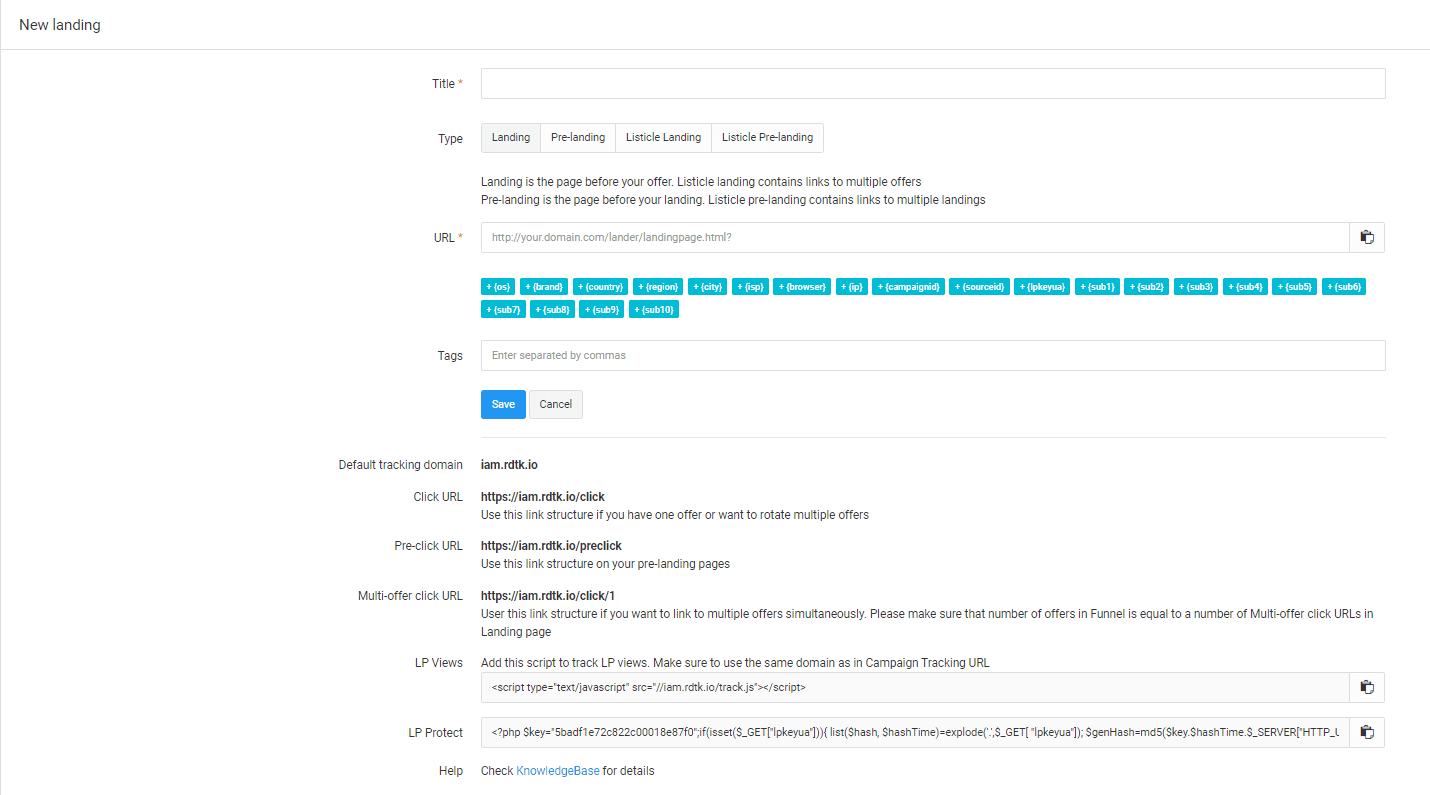
- Set-up Landing Pages
You can create Landing, Pre Landing, Listicle Page, and Listicle Pre-Landing Pages. Select one of these options and continue on the process. Insert the URL where it is requested and that’s it!
- Set-up Campaign
All the basic things are done. All you need to do is insert everything into your RedTrack campaign page.
For the full walkthrough, see how to set up and track Facebook and TikTok campaigns in RedTrack.
This simple campaign setup took us less than 5 minutes. Yeah, it is that fast. And the best part about it is that if you are well organized you can create dozens of these in no time! RedTrack really is a great tool for these things!
Additional Features
- Autoscale – Redirects are always fast and real-time.
- Smartlinks – Auto-optimization that uses your campaign data to route traffic
- Saas – Don’t worry about hardware, just focus on your campaigns
- Custom Domains – You can use your own tracking domains (check the current terms on RedTrack’s site for any extra fees)
- Geo-Balancing – It will distribute your campaigns across multiple GEOs
- LP Pixel – Split testing and rotating offers is made easy with LP tracking pixels
- Custom Dashboard – Customize the dashboard so it fits your need and use-case the best
Conclusion
Media buyers, affiliates, agencies, and advertisers should definitely check out RedTrack and its features. It offers a great value proposition and is arguably more affordable than the competition. It offers real-time access to ad tracking, impressions, clicks, conversions a lot more. It is reasonably priced and it suits most wallets and requirements. Its vast features include things like analytic tools that can help monitor, understand, predict, and handle ups and downs of your affiliate marketing campaigns. IF you want a hassle-free tool for use, this is the right one to use!
Pricing
RedTrack is very competitive in pricing and features. If you are comparing it against other trackers, see our tracker comparison for 2026. They offer a subscription model that starts with a 14-day free trial. After the 14-day trial you pick a plan from the lists below. Annual billing is priced as ten months for twelve (two months free).


Affiliate and lead gen plans:
- Builder: The entry plan for a single user, with 2M events. It costs $79/month or $69/month if you buy annually.
- Solo: One user and 5M events, for $169/month or $141/month for the annual plan.
- Team: Built for teams and partners, with 5 users and 20M events. It is available for $399/month or $333/month if you buy the yearly subscription.
- Enterprise: 15 users and 75M events, for $999/month or $833/month if you buy annually. A Custom plan is also listed.
Ecommerce and DTC plans: Relay (free), Brand at $99/month ($83/month annual) and Agency at $599/month ($499/month annual). White label setup is still offered. Last reviewed: October 5, 2026 – pricing and plan details checked against RedTrack’s own pages.
Pros
- Great set of features
- Parallel tracking
- Landing page multi-offers
- Tracking across display, mobile, app, native, push, etc.
- Conversion reporting
- Great value
- Excellent support
Cons
- Some great features are hidden in the menus
