

Short answer: Dolphin Anty is the better pick for Facebook ads and affiliate work in my view, mainly for its profile and cookie handling and team sharing, while AdsPower wins on RPA automation. Dolphin Anty has a Free plan with 5 profiles (AdsPower: 2) and paid plans from $10 a month; compare both free tiers before you pay.
Choosing where to run your traffic next? See the traffic sources guide.
If you’re running Facebook ads, affiliate lead generation campaigns, e-commerce, crypto, sweepstakes, or pretty much any vertical where accounts can get banned for doing the wrong thing, or sometimes for doing absolutely nothing wrong, your browser setup matters more than you think.
I’ve had this issue for years. Random account bans, fresh accounts getting banned right away, endless verification requests, disabled ad accounts, Facebook Business Manager bans, and all kinds of weird Facebook flags that make no sense. It’s a problem that a lot of affiliates and media buyers deal with every day.
So when I tell you that an anti-detect browser isn’t some nice-to-have feature, I really mean it. It’s one of those tools that can make the difference between scaling campaigns and constantly fighting bans.
Just take Facebook as an example. One wrong setup can burn your
- Facebook profile
- Business Manager
- Ad account
- Pixel
- Page
- Spend limit
- and weeks of work
Sometimes without a single warning.
And once Facebook starts looking at you as suspicious, things usually get worse. Even when you create a brand-new account and follow all the rules, the chances of getting flagged, restricted, or banned again seem to increase dramatically.
That’s exactly why experienced media buyers, affiliates, agencies, and account farmers use anti-detect browsers like Dolphin Anty and AdsPower. These tools aren’t anything new. They’ve been around for years. The problem is that a lot of people still don’t know they exist or understand how they actually work.
By the end of this article, you’ll know which is the best anti-detect browser for Facebook Ads and affiliate marketing, and how to setup everything so as to help you avoid Facebook account bans, Business Manager restrictions, verifications, and other account issues.
Dolphin Anty vs AdsPower: Quick Verdict
The short answer is that Dolphin Anty is the better choice for serious affiliate marketers and Facebook media buyers.
That’s not because AdsPower is bad. It’s actually one of the best anti-detect browsers on the market. It’s affordable, packed with features, and has some of the strongest automation tools available today.
But if your goal is running Facebook ads, managing warmed accounts, reducing Facebook account bans, keeping cookies safe, and maintaining long-term account stability, Dolphin Anty is the browser I would choose.
This matters even more now because Facebook is on a bit of a killing spree. Their automated detection systems have become increasingly aggressive, and plenty of legitimate advertisers are getting caught in the crossfire. I’ve personally seen friends lose accounts that had done nothing remotely suspicious.
One example that comes to mind happened a couple of years ago. One of our media buyers accidentally opened a warmed Facebook account through regular Chrome instead of the anti-detect profile we normally used. A few days later, the account started getting alerts, suspicious login warnings, and eventually identity verification requests. Was that the only reason? Maybe. Maybe not. But after seeing enough situations like that, you stop taking chances.
If you’re managing valuable Facebook assets, aged accounts, agency accounts, or accounts with cookies that are actually worth money, your browser environment is not something you can afford to ignore.
Will an anti-detect browser make you immune to bans? No.
But it can dramatically reduce unnecessary risk, eliminate a lot of common fingerprinting mistakes, and give you a much cleaner setup for running Facebook ads, affiliate campaigns, and managing multiple accounts at scale.
| Category | Winner |
| Facebook Ads account management | Dolphin Anty |
| Affiliate marketing workflow | Dolphin Anty |
| Lower risk of bad fingerprint setup | Dolphin Anty |
| Cookie/session confidence | Dolphin Anty |
| Team workflow for media buyers | Dolphin Anty |
| Proxy workflow | Dolphin Anty |
| Automation/RPA | AdsPower |
| Beginner pricing | AdsPower |
| Free plan testing | Dolphin Anty |
| Overall for serious affiliates | Dolphin Anty |
Verdict: Both are great, but I would say AdsPower is a good general multi-account browser. Dolphin Anty is better for affiliates and media buyers.
Last reviewed: October 5, 2026 – details checked against the vendor’s official pages. Prices and limits below are from the vendors’ pricing pages on that date.
-
Dolphin Anty Overview

Dolphin Anty is a Chromium-based anti-detect browser built specifically for multi-account work.
Its biggest strength is that it feels like it was designed by performance marketers for performance marketers. The main focus is on managing accounts efficiently and safely.
With Dolphin Anty, you can create separate browser profiles, assign proxies, organize accounts, manage cookies, transfer profiles, share access with team members, and control exactly who can access what.

Each browser profile operates as its own separate environment.So, if you’re managing Facebook ad accounts, TikTok ad accounts, Google Ads accounts, affiliate network dashboards, and various other platforms. With Dolphin Anty, every account can live inside its own browser profile with its own cookies, settings, browser fingerprint, and proxy.
The result is simple: accounts don’t interfere with each other.
If one account gets restricted, flagged, or banned, it doesn’t automatically create problems for the rest of your setup. That’s exactly what you want when you’re running serious Facebook Ads or managing multiple affiliate campaigns.
Dolphin Anty is especially useful for:
- Facebook ads media buyers
- Affiliate marketers
- Account farmers
- Lead generation teams
- E-commerce advertisers
- TikTok advertising teams
- Google Ads teams
- Crypto marketers
- Agencies managing client accounts
- VAs working with ad accounts
- Teams that need profile sharing and permission controls
One thing I personally like about Dolphin Anty is that it isn’t trying to be cute.
There aren’t ten different AI tools shoved into the dashboard just because every software company thinks they need AI now.
Instead, it focuses on the things affiliates actually care about.
You create profiles. You assign proxies. You manage cookies. You share access. You organize accounts. You scale.

That’s it.A lot of software today suffers from feature bloat. You end up paying for dozens of features you’ll never use, and half of them don’t work the way the marketing page promised anyway.
Dolphin Anty takes the opposite approach. It’s simple, it works, and it fits naturally into an affiliate marketing workflow.
For media buyers, account farmers, and affiliate teams, that’s probably its biggest advantage.
If you want to see how Dolphin Anty fits a TikTok workflow, read how to use Dolphin Anty to scale TikTok ads.
-
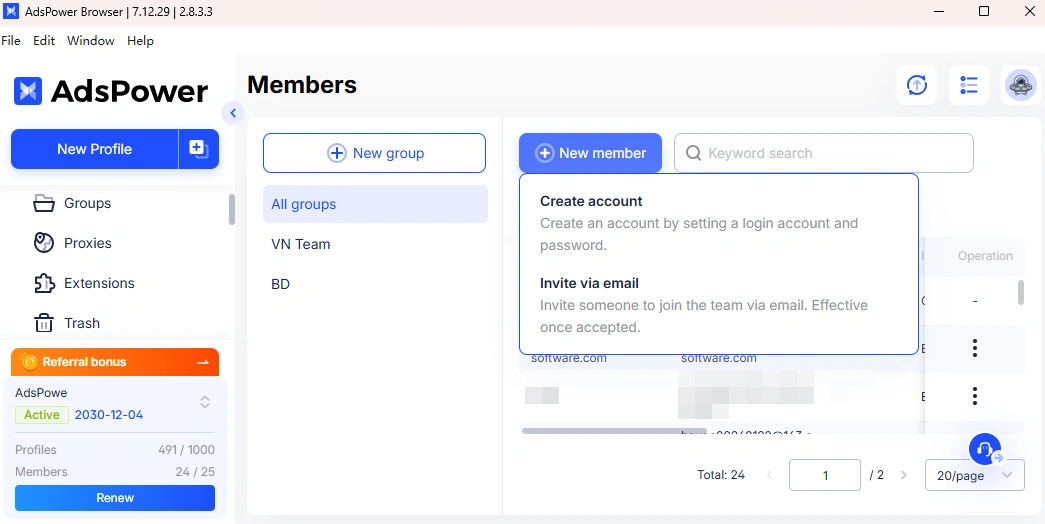
AdsPower Overview

AdsPower is one of the most popular anti-detect browsers on the market.Like Dolphin Anty, it allows users to create browser profiles with separate fingerprints, proxies, cookies, and settings. The goal is the same: create isolated browser environments that can manage multiple accounts without everything being connected together.
One of AdsPower’s biggest strengths is its feature set.
It offers browser profile isolation, fingerprint customization, proxy integration, team collaboration tools, RPA automation, local API access, bulk profile creation, multi-account management, and a long list of other features.
AdsPower became popular for a reason. It’s “affordable”, relatively easy to get started with, and offers a huge amount of functionality for the price. For beginners and smaller teams, it can be an excellent choice.
I’ve personally used AdsPower for years, and its core features work well. Multi-account management, marketplace accounts, social media account management, e-commerce operations, profile creation, and team collaboration all work exactly the way they’re supposed to. But as my needs grew I switched to Dolphin Anty as it did what I needed better.
The reason comes down to consistency.
With Facebook and Meta in general, trust is everything. It’s not enough to create hundreds of browser profiles. You need those profiles to look stable, believable, and consistent over long periods of time.
Anybody can create a profile. The hard part is maintaining a browser environment that doesn’t raise unnecessary red flags months later.
Both platforms do a good job overall, but I think Dolphin Anty puts slightly more emphasis on keeping browser environments clean and organized.
But if my goal was running valuable Facebook ad accounts, protecting warmed profiles, and reducing preventable account issues, I’d still give the edge to Dolphin Anty.
For a longer look at the other side, read my AdsPower review on managing multiple accounts.
-
Side by Side Feature Comparison
Feature Dolphin Anty AdsPower Why It Matters Browser profiles Yes Yes Needed to isolate accounts Cookies per profile Yes Yes Important for aged Facebook accounts Proxy assignment Strong Strong Bad proxy setup causes bans Bulk profilemanagement Yes Yes Needed when scaling Team access Yes (extra users cost $10 to $25 per month on paid plans) Yes (the Free plan has no team members) Useful for buyers, farmers, VAs Profile permissions Yes Yes Protects valuable accounts Cloud sync Yes Yes Helps teams use profiles across devices Fingerprint settings Yes Yes Reduces account linking Automation/API API, Selenium/CDP support, Synchronizer (API and automation need a paid Dolphin plan) Local API, RPA, automation Useful for scale Free profiles 5 Free Profiles 2 Free Profiles Good for beginners Facebook Ads workflow Better fit Good but broader Affiliates need ad-account-focused workflow Security confidence No incident known to me January 2025 supply-chain attack on AdsPower’s wallet-extension downloads (MetaMask and OKX, replaced with a malicious version between Jan 21 and 24; reported losses of about $4.7M across 5 users). It concerned crypto wallet extensions, not browser profiles or cookie data. Trust matters when cookies are money The important thing is this:
Both tools have features. But features are not the same as workflow.
A media buyer does not only need “a profile.”
A media buyer needs:
- One clean profile per Facebook account
- One stable proxy per account
- Cookies that do not get lost
- Easy profile sharing
- Fast account launching
- Easy team permissions
- Bulk profile actions
- A way to avoid mixing accounts by mistake
- Less chance of fingerprint leaks
- Less chance of suspicious login triggers
This is where Dolphin Anty feels better.
It is more aligned with how affiliates actually work.
-
What Is an Anti-Detect Browser?

An anti-detect browser lets you create separate browser profiles that look like completely different devices. Each profile can have its own cookies, browser fingerprint, proxy, timezone, language, operating system settings, screen resolution, and pretty much everything else that websites use to identify you.For affiliates and media buyers, this matters because platforms like Facebook, Google, TikTok, affiliate networks, and advertising platforms don’t just track your IP address. They look at your entire browser environment. In some cases, they even look at hardware information, geographical location, browser behavior, and dozens of other signals.
This is where anti-detect browsers like Dolphin Anty and AdsPower come in.
Their job is to isolate browser profiles and reduce the amount of information that can be used to connect multiple accounts together. In simple terms, they allow you to run multiple accounts in parallel while keeping each browser profile separated from the others.
A lot of beginners think a VPN or proxy alone is enough.
Unfortunately, that’s usually not the case.
A VPN changes your IP address. A proxy changes your connection route. Neither changes the rest of your browser fingerprint.
If Facebook sees ten different accounts logging in from ten different IP addresses but all sharing the same browser fingerprint, that can still look suspicious.
That’s why experienced affiliates usually combine anti-detect browsers with quality proxies. Together, they create a cleaner setup where each profile has its own identity and doesn’t interfere with the others.
And that’s exactly where the name “anti-detect” comes from. These browsers are designed to make browser profiles look like separate users instead of multiple accounts being controlled from the same device.
-
Browser Fingerprints
Browser fingerprints are something a lot of affiliates still don’t know much about, and they cause far more account problems than most people realize.
Most people assume Facebook account bans happen because of bad proxies. Sometimes that’s true. But a lot of the time, the real problem is an inconsistent browser environment.
Let’s say your proxy says you’re in Germany. Your browser time zone says you’re in Ukraine. Your IP looks like it’s coming from a mobile connection, but your browser fingerprint looks like a data center desktop. Right away, those signals don’t match.
And those aren’t the only things platforms can see.
Facebook, Google, TikTok, and other platforms can look at your IP address, canvas fingerprint, WebGL fingerprint, DNS configuration, font lists, cookies, account behavior, and dozens of other signals. In some cases, they can even collect information related to your hardware environment.
One of the biggest causes of Facebook account bans isn’t necessarily the account itself. It’s a browser environment that doesn’t make sense.
When enough signals don’t match, you start looking suspicious.
This becomes an even bigger problem if you’ve had accounts banned in the past. The more signals platforms can connect together, the easier it becomes to associate new accounts with older ones.
That’s why browser fingerprint consistency matters so much.
One thing I like about Dolphin Anty is that it encourages users to verify their browser environment before logging into valuable accounts. It includes tools that help identify potential problems before they turn into restrictions, checkpoints, or verification requests.
For example, it can help you check for:
- IP leaks
- WebRTC leaks
- Browser fingerprint inconsistencies
- Canvas issues
- WebGL mismatches
- Other signals that could raise red flags
AdsPower also does a good job here. Both platforms are among the best anti-detect browsers available today.
I just think Dolphin Anty does a slightly better job of helping affiliates verify that everything is configured correctly before they start working with important accounts.
The difference isn’t massive. But if we’re talking specifically about fingerprint consistency, Facebook Ads account safety, and reducing obvious leaks, I’d give a small edge to Dolphin Anty.
-
Facebook Ads
Let’s be honest. This is the reason most people are reading this article. And this is also the reason why I started using anti detect browsers in the first place!
If you’ve been running Facebook Ads long enough, you’ve probably experienced at least one of these:
- Ad account disabled
- Business Manager restricted
- Page restricted
- Payment issues
- Identity verification
- Video selfie requests
- Suspicious login alerts
- Random checkpoints
- “We noticed unusual activity”
- “You can’t advertise”
Some of these happen because of policy violations. Others happen because Facebook’s systems get things wrong.
The bigger problem is that once one account gets restricted, the risk often spreads to everything connected to it. Facebook is extremely good at finding relationships between accounts, devices, browser environments, and login behavior.
That’s why I started taking anti-detect browsers seriously.
After years of dealing with Facebook account bans, Business Manager restrictions, and endless verification loops, I got tired of losing accounts because of preventable mistakes.
For Facebook Ads, consistency is everything.
That means:
- For every Facebook account, use this structure:
Item Best Practice Browser profile One Dolphin profile per Facebook account Proxy One dedicated sticky proxy per profile GEO Match proxy country/city with account history Cookies Keep them stable; do not clear unless needed Timezone Match proxy/account location Language Match account and GEO logic Login behavior Do not jump between countries/devices Team access Share the profile, not the raw login Payments Keep payment method consistent and clean Warmup Do not go from zero to aggressive spending instantly The more stable everything looks, the better.
Based on my experience, Dolphin Anty makes this workflow easier to manage.
You can keep every Facebook account inside its own dedicated profile, assign a dedicated proxy, preserve cookies, organize profiles with folders and tags, and share profiles with team members without forcing everyone to log in through their own browser.
A few years ago, one of our media buyers accidentally opened a warmed Facebook account through regular Chrome instead of the anti-detect profile we normally used. A few days later, the account started getting checkpoints, suspicious login warnings, and eventually identity verification requests.
Maybe that was the cause. Maybe it wasn’t.
But after seeing enough situations like that, you stop taking chances. That’s why profile consistency matters.
With Dolphin Anty, the profile travels instead of the environment, constantly changing. Multiple people can work on the same account while maintaining a much cleaner browser identity.

Will Dolphin Anty prevent every Facebook account ban?
No.
But it will help reduce preventable mistakes, avoid account contamination, and create a much cleaner Facebook Ads workflow.
-
Cookies and Session Safety
For affiliates, cookies are not just random browser junk.
Cookies are money.
A Facebook account with aged cookies and a consistent login history is usually far more valuable than a fresh account that gets logged into from a new device every day.

Facebook, Google Ads, TikTok, and other platforms track far more than just your IP address. They look at login history, device consistency, browser behavior, session activity, and a variety of trust signals.
That’s why it’s not enough to simply have an account. Ideally, you also want history behind that account.
Cookies help preserve:
- Login history
- Session trust
- Device consistency
- Account behavior patterns
- Warm-up history
- Platform confidence
- Reduced login challenges
This is one of the biggest reasons cookie management matters.
When people say, “My account got banned right after I logged in,” what often happened isn’t that the account was randomly banned.
Usually something changed.
Maybe they lost their cookies, imported cookies incorrectly, used the same cookies across multiple environments, switched browsers, changed proxies, cleared profile data, logged into the same account from multiple devices, or anything else
All of those things can create trust issues.
This is one of the reasons I prefer Dolphin Anty for serious Facebook Ads operations.
It gives you a clear way to manage profiles, cookies, proxies, and team access from a single dashboard. That makes it less likely that someone accidentally destroys a warmed-up account because they logged in through regular Chrome or imported the wrong cookies into the wrong profile.

Still, when you’re storing valuable Facebook sessions, ad accounts, Business Managers, crypto wallets, and agency assets inside browser profiles, reputation matters.
That’s one reason Dolphin Anty currently has a stronger reputation among many affiliates when it comes to session management and account safety.
-
Verification and Suspicious Logins
One of the most annoying parts of running Facebook Ads is dealing with verification requests.
You log in and suddenly Facebook wants something from you:
- Email verification
- Phone verification
- Two-factor authentication
- “Was this you?”
- Identity confirmation
- ID upload
- Video selfie
- Business verification
- Account review
- Page review
Some of these checks are necessary. Facebook has to deal with hacked accounts, fake accounts, and abuse every day.
The problem is when they start happening constantly.
For me, if I’m getting verification requests more than once a week, I usually assume something is wrong with my setup.
Most of the time, these challenges are triggered because Facebook detects a change it doesn’t like.
Maybe it’s a new IP address.
Maybe it’s a new browser fingerprint.
Maybe it’s a new device.
Maybe it’s a new timezone.
Maybe it’s a completely different browser environment than the one the account normally uses.
Of course, sometimes Facebook gets it wrong.
One of my media buyers had her personal Facebook account restricted even though we were following all the usual safety practices. Facebook requested a video selfie, she completed it, the account was briefly restored, and then restricted again.
Three months later, we’re still waiting.
The good news is that because we were using an anti-detect browser, that restriction didn’t spill over into our business accounts.
That’s one of the biggest benefits of profile isolation.
Even when Facebook does something unreasonable, it doesn’t automatically contaminate every account, Business Manager, page, or ad account connected to your operation.
If you’re looking for ways to reduce Facebook account bans and avoid endless verification loops, this is one of the biggest areas to focus on.
Whether you’re using Dolphin Anty or AdsPower, always verify that your setup is correct before logging into valuable accounts.
This is the checklist I personally use:
- Is this the correct browser profile?
- Is the same proxy still assigned?
- Is the proxy alive?
- Does the GEO still match?
- Does the timezone match the proxy?
- Are cookies still present?
- Has anyone logged into this account elsewhere?
- Has the account recently changed countries?
- Did the payment method change?
- Was the account recently restricted?
- Is the Business Manager clean?
Most people don’t get banned because they’re unlucky.
They get banned because their setup is messy.
-
Proxy Management
Your anti-detect browser is only as good as your proxy setup.

If you use garbage proxies, Dolphin Anty will not save you, AdsPower will not save you, God will not save you!For Facebook Ads, proxy quality matters a lot. Most account issues I see aren’t caused by Dolphin Anty or AdsPower. They’re caused by bad proxy decisions.
If you need to buy proxies, start with the proxy buying guide for 2026.
-
Mistake #1: Using Cheap Datacenter Proxies for Valuable Accounts
Cheap datacenter proxies are often heavily abused. They may have already been used by hundreds of other people and could already be flagged by Facebook, Google, TikTok, or other platforms.
If you’re using them for warmed Facebook accounts, don’t be surprised when you start getting checkpoints, verification requests, or account reviews.
-
Mistake #2: Using Rotating Proxies for Logged-In Accounts
Rotating proxies are useful for certain tasks, but logged-in ad accounts are usually not one of them.
If your IP address keeps changing every few minutes, platforms may view that as unusual behavior. For Facebook accounts, you generally want a sticky residential or mobile proxy that remains consistent over time.
-
Mistake #3: GEO Mismatches
If an account was warmed in the United States, use a US proxy.
If the account is German, use Germany.
If the account normally operates from the UK, use the UK.Don’t warm an account in one country and suddenly start operating it from another unless you have a legitimate reason.
-
Mistake #4: Sharing One Proxy Across Too Many Accounts
If ten accounts are using the same proxy and one gets burned, flagged, or restricted, the others may be affected as well.
The more separation you have between accounts, the better.
-
Mistake #5: Changing Everything at Once
This happens all the time.
People switch to a new proxy, a new browser profile, new cookies, a new payment method, a new campaign, a new page, and a new Business Manager all at once.
Then they ask why Facebook banned them… It’s because you changed everything, bro! If you’re making changes, make them gradually.
Why Dolphin Anty Helps

It makes it easy to assign proxies to specific profiles, keep them organized, and ensure that the right account always uses the right connection. This becomes especially valuable when multiple team members are working on the same accounts.A lot of account problems aren’t caused by Facebook.
They’re caused by human error.
Someone logs into the wrong profile, uses the wrong proxy, opens an account from the wrong browser, or imports cookies into the wrong environment.
Dolphin Anty helps reduce those mistakes by keeping everything organized and attached to the correct profile.
And that’s one of the biggest reasons I recommend it for Facebook advertisers.
-
-
Team Workflow
If you’re a solo affiliate running a couple of accounts, team workflow probably isn’t something you think about very often.
But once you’re running a larger operation, it becomes extremely important.

A typical affiliate team might have:
- Account farmers
- Media buyers
- Creative uploaders
- VAs
- Team leads
- Agency managers
- Client account managers
In my case, I mostly have media buyers and a few team leaders, but even for a setup like mine, an anti-detect browser makes a huge difference.
One of the biggest advantages is isolation. If one person gets restricted, flagged, or runs into account issues, it doesn’t automatically create problems for everybody else. At the same time, multiple team members can still work on the same accounts when necessary.
Without an anti-detect browser, everybody ends up logging in from different devices, browsers, and environments.
With Dolphin Anty and AdsPower, you can build a much cleaner workflow. Team members can work with accounts that maintain the same browser profile, cookies, fingerprints, proxies, and other settings over time. Instead of constantly changing environments, the profile itself remains consistent.
In an ideal setup, everyone has their own access while the underlying browser environments remain organized and consistent. That means fewer mistakes, fewer login issues, and fewer situations where platforms start asking questions because ten different people touched the same account from ten different environments.
Both Dolphin Anty and AdsPower handle team collaboration well. However, I would still give a slight edge to Dolphin Anty because its profile-sharing and permission management systems feel a bit cleaner and easier to manage.
And honestly, anything is better than sending raw account credentials through Telegram and hoping nobody accidentally leaks or destroys an account.
-
Automation and API Comparison
For most things, I prefer Dolphin Anty.
Automation is where AdsPower really deserves credit.
AdsPower has some of the strongest automation tools available in the anti-detect browser space. If your main goal is visual automation, repetitive tasks, bulk profile workflows, browser automation, or large-scale account management, AdsPower is probably the stronger choice.
Its RPA tools are well-developed, its local API is powerful, and it gives advanced users plenty of flexibility.
That doesn’t mean Dolphin Anty lacks automation features. It covers all the basics that most affiliates and media buyers actually need. You can still automate workflows, manage multiple profiles efficiently, use synchronizers, and integrate with external tools.
The difference is focus.
Dolphin Anty focuses more on account management, profile consistency, and workflow simplicity.
AdsPower focuses more on automation power.
AdsPower is great at:
- Built-in RPA automation
- Visual automation workflows
- Bulk browser operations
- Local API integrations
- Large-scale profile management
- Repetitive task automation
Dolphin Anty is great at:
- Facebook Ads workflows
- Profile management
- Team collaboration
- Cookie management
- Session stability
- Profile consistency
This is one of the few categories where AdsPower clearly beats Dolphin Anty.
If your business depends heavily on browser automation, repetitive workflows, and RPA functionality, AdsPower is probably the better choice.
If your priority is Facebook Ads, affiliate marketing, and maintaining stable browser environments, I still lean toward Dolphin Anty.
The good news is that neither choice is wrong. Both platforms are capable of handling most automation scenarios affiliates encounter. AdsPower simply offers more power and flexibility in this specific category.
If you also run TikTok, Reels or Shorts accounts and are weighing cloud phones against anti-detect browsers, see my GeeLark cloud phone review.
-
Pricing

Let’s get the obvious part out of the way.AdsPower is usually seen as the cheaper option, although Dolphin Anty’s entry paid plan is only $10 a month for 60 profiles.
That’s one of the main reasons people choose it over Dolphin Anty, and if you’re a beginner, price absolutely matters. If you’re just getting started, it often makes sense to keep costs low while you figure out what works.
But once you’re an established affiliate or media buyer, the cheapest tool isn’t always the cheapest option.
Think about what you can lose:
- Aged Facebook profiles
- Business Managers
- Ad accounts
- Pages
- Pixels
- Payment methods
- Spend limits
- Campaign data
- Creative tests
- Domains
- Cloaking setups
- Proxy costs
- Your own sanity
If you lose a warmed account that took weeks to prepare, saving a few dollars per month on software suddenly doesn’t seem very important.
That’s why I look at pricing differently.
For small-scale testing, AdsPower makes a lot of sense. It’s affordable, packed with features, and gives you a huge amount of functionality for the price.
For serious Facebook Ads operations, I think Dolphin Anty offers better value because it’s more closely aligned with the workflow needed to keep accounts stable over the long term.
It’s also worth mentioning that Dolphin Anty isn’t always as expensive as people think. Most affiliates don’t need the biggest plan available. If you choose the plan that actually fits your operation, the price difference becomes much smaller. Dolphin Anty has a Free plan (5 profiles, 1 user, no API access) and paid plans from $10 a month (Starter, 60 profiles) through $89 (Base, 100 profiles) and $159 (Team, 300 profiles) to $299 (Enterprise). Check AdsPower’s pricing page for its current paid plans.
And once you’re running a serious operation, software costs shouldn’t be the deciding factor anyway. A single successful campaign can often cover an entire year’s subscription cost.

So my pricing verdict is simple:
AdsPower wins on price.
Dolphin Anty wins on value for serious affiliates.
If you’re optimizing for cost, AdsPower is hard to beat.
If you’re optimizing for account stability, workflow quality, and long-term operations, I think Dolphin Anty delivers more value overall.
-
Final Verdict: Dolphin Anty or AdsPower
If you’re looking for the best anti-detect browser for affiliate marketing, I recommend Dolphin Anty.
If you’re looking for the best anti-detect browser for Facebook Ads, I also recommend Dolphin Anty.
That doesn’t mean AdsPower is a bad product. Quite the opposite.
AdsPower offers excellent automation, strong multi-account management, a powerful local API, and a low-cost entry (check its pricing page for current plans). For beginners and automation-heavy users, it’s a very strong option.
But when I look specifically at Facebook Ads, affiliate marketing, account stability, cookie management, team workflows, and reducing preventable account issues, Dolphin Anty comes out ahead.
Dolphin Anty is the better pick.
Here is why:
- It is better suited for Facebook Ads workflows.
- It is better for affiliate teams.
- It helps keep account environments consistent.
- It makes proxy and profile management easier.
- It is better for managing cookies and sessions safely.
- It reduces the chance of stupid leaks and mismatches.
- It is better for account farmers, media buyers, and agencies.
- It feels more built for people who actually run ads.
No anti-detect browser can guarantee zero Facebook account bans.
If your creatives are trash, your landing page is non-compliant, your payment method is burned, your proxy is garbage, or your account farming sucks, Dolphin Anty will not save you.
But if your goal is reducing preventable mistakes, maintaining cleaner browser environments, protecting warmed accounts, and avoiding unnecessary verification loops, Dolphin Anty is the browser I would choose.
If you are playing with $10 test accounts, use whatever.
If you are running real campaigns and one ban can cost you thousands, use Dolphin Anty.
You can even get a discounted subscription to their services with this link!Category Dolphin Anty AdsPower Facebook Ads workflow 9/10 7/10 Affiliate marketing fit 9/10 7.5/10 Fingerprint management 9/10 8/10 Cookie/session workflow 9/10 7/10 Proxy management 9/10 8/10 Team collaboration 9/10 8/10 Automation 8/10 8.5/10 Beginner pricing 8/10 8.5/10 Security confidence 9/10 7/10 Overall for Facebook Ads 9/10 7/10 Overall for affiliates 9/10 7.5/10
